
High Quality Backup Phones
Devices Page
Choose a dependable google pixel as your next backup phone without overbuying or settling for an unreliable spare. This page highlights practical Pixel options built for everyday emergency use, travel, work separation, family needs, and quick replacement when your primary phone is unavailable. Availability, condition, storage, color, carrier compatibility, and pricing may vary, so review the current device listing before you buy.
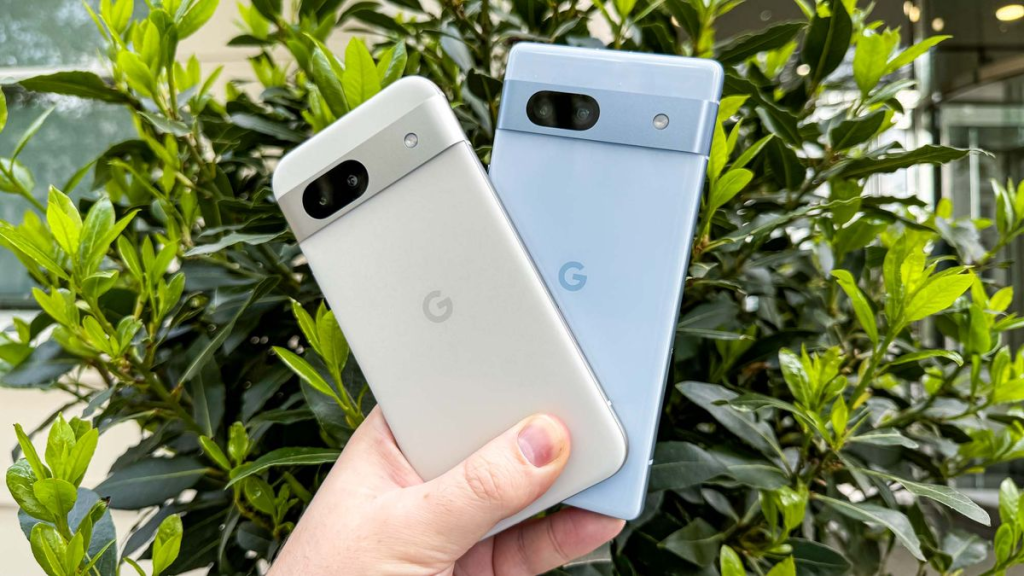
Google Pixel 8a
The pixel 8a is the strongest choice for buyers who want a newer backup phone that still feels current when it is pressed into daily use. It offers a compact modern Pixel design, Google’s Tensor G3 chip, a 6.1-inch OLED display, a capable dual rear camera system, and the clean Android experience Pixel phones are known for. For backup phone use, its biggest advantage is confidence: it is fast enough for navigation, banking apps, messaging, video calls, hotspot use, and photo capture if your main phone breaks, gets lost, or needs repair.
The Pixel 8a also suits people who do not want their spare device to feel like a compromise. If you travel with a second phone, keep a separate work line, or need a reliable device ready in a drawer, this model gives you a more future-friendly experience than older budget phones. It may cost more than the Pixel 7a depending on condition and stock, but the added performance headroom makes sense if the backup might become your temporary primary phone.
Google Pixel 7a
The pixel 7a is a smart value pick for shoppers who want a high quality backup phone at a typically lower cost than a newer Pixel model. It features Google’s Tensor G2 chip, a 6.1-inch OLED display, a strong camera setup, and the same simple Pixel software style that keeps the phone easy to use after weeks or months in storage. It is especially appealing when you want a spare that can handle essential apps without paying for the newest generation.
As a backup phone, the Pixel 7a works well for calls, texts, maps, email, app-based two-factor authentication, rideshare apps, and casual photos. It is also a good choice for students, parents, small business owners, or anyone who wants an emergency Android phone that does not feel outdated the moment it is turned on. The main tradeoff is that it is an older generation than the Pixel 8a, so buyers who want the longest runway may prefer stepping up.
Which Google Pixel works best as a backup phone?
The best Google Pixel for a backup phone depends on how serious the backup role is. Choose the Pixel 8a if you want a spare that can smoothly become your main phone for days or weeks. Choose the Pixel 7a if you want strong everyday capability while keeping the purchase more budget-conscious.
Both phones make sense because they avoid the two most common backup phone problems: poor software experience and weak everyday performance. A cheap, aging phone can be frustrating when you need it most; apps may lag, cameras may disappoint, and setup can become a chore. A Pixel backup phone gives you a familiar Android interface, useful Google services, and enough capability to handle real situations instead of just sitting unused.
Key buying differences to consider:
- Performance needs: Pixel 8a is better if you expect heavier app use, frequent video calls, or temporary primary-phone duty. Pixel 7a is still suitable for normal essentials.
- Budget sensitivity: Pixel 7a is usually the more value-focused option when available in good condition. Pixel 8a is the stronger long-term purchase if the price difference is acceptable.
- Backup urgency: If you need a phone only for emergencies, Pixel 7a may be enough. If the device will travel with you or support work, Pixel 8a offers more reassurance.
- Camera expectations: Both deliver the practical Pixel camera experience people want in unexpected moments, from insurance photos to travel snapshots.
- Comfort and size: Both are manageable, pocket-friendly phones compared with many larger devices, making them easy to store, carry, or lend to a family member.
Built for the moments when your main phone is not available
A backup phone is not just a spare screen. It is a plan for the day your primary phone is cracked, stolen, water-damaged, out of battery, or tied up during repair. A dependable Pixel can keep you reachable, help you access accounts, and reduce the disruption that usually comes with losing phone access.
Picture a common scenario: your main phone stops charging the night before a work trip. With a prepared Pixel backup phone, you can move your SIM or activate a compatible service plan, sign into key apps, download boarding passes, open maps, and keep messages flowing. Without one, you may spend the morning searching for a replacement, borrowing devices, or being locked out of accounts that require phone verification.
Practical backup uses include:
- Keeping a working phone ready during repairs or device upgrades
- Carrying a second phone while traveling in case of loss or theft
- Separating work calls, gig apps, or business messaging from your personal phone
- Giving a reliable emergency device to a teen, parent, or caregiver
- Using a spare for two-factor authentication, maps, banking, and communication
- Maintaining a hotspot-ready device when your main phone battery is low
Pixel 8a advantages for backup use
The Pixel 8a is best for buyers who want their backup phone to feel close to a current everyday device. Its newer processor helps with smooth switching between apps, better responsiveness, and a more comfortable experience if you need to rely on it longer than expected. That matters because emergencies rarely happen when you have time to tolerate a slow device.
Its compact OLED display makes it easy to use for maps, messaging, email, and browsing without carrying a bulky spare. The camera system is useful for documenting accidents, scanning documents, capturing receipts, or taking clear photos while traveling. For anyone who works from their phone, the Pixel 8a is the safer backup choice because it reduces the feeling of stepping down to a temporary device.
Best fit for:
- Travelers who want a capable second phone
- Professionals who cannot afford phone downtime
- Buyers who want a newer Pixel without choosing a flagship model
- Families who want a reliable spare that can be shared
- Anyone who may need to use the backup phone as a primary phone for an extended period
Potential tradeoffs:
- It may cost more than the Pixel 7a
- It may be more phone than you need for rare emergency-only use
- Final value depends on current condition, storage, and carrier compatibility
Pixel 7a advantages for backup use
The Pixel 7a is the practical value choice. It gives you the core Pixel experience, a compact display, capable cameras, and dependable day-to-day app support without necessarily paying for the newest model. For many shoppers, that is exactly what a backup phone should be: reliable enough to trust, affordable enough to keep on hand.
This model is especially attractive if the phone will spend most of its time stored, charged, and ready. It can still handle calls, messages, maps, app logins, email, and emergency photos when needed. It also makes sense as a secondary device for occasional business use, temporary family use, or travel backup where replacing a flagship would feel excessive.
Best fit for:
- Budget-conscious buyers who still want a quality Android phone
- Emergency-only backup phone setups
- Students or families needing a dependable spare
- Users who want Pixel software and cameras at a lower entry point
- People replacing an older backup phone that no longer runs essential apps well
Potential tradeoffs:
- It is an older generation than the Pixel 8a
- It may offer less performance headroom for heavier use
- Condition and battery health are especially important when comparing individual units
What to check before you buy
A good backup phone should be easy to activate, easy to trust, and easy to keep ready. Before purchasing any Pixel, review the listing details carefully so the device matches how you plan to use it. The right choice is not only about the model; it is also about condition, compatibility, storage, and whether the phone can support your carrier or intended setup.
Use this checklist before ordering:
- Carrier compatibility: Confirm the phone works with your current carrier or the service you plan to use.
- Unlocked status: An unlocked device is often more flexible for travel, SIM swaps, or family use.
- Storage capacity: Choose enough storage for essential apps, offline maps, documents, and photos.
- Condition: Look for clear information about screen quality, body wear, and functional testing.
- Battery expectations: Backup phones should hold a charge well enough to be useful when needed.
- Charging accessories: Confirm what is included so you are not caught without the right cable or charger.
- Return policy or support: Review the purchase terms before relying on the phone as your emergency device.
Simple setup for a ready-to-use backup phone
Once your Pixel arrives, set it up before you need it. A backup phone that is still in a box is less helpful during a stressful moment. Sign in, install essential apps, test calls and messages, and make sure your recovery codes or account access methods are current.
A simple preparation plan:
- Charge the phone fully and complete Android setup.
- Confirm Wi-Fi, Bluetooth, camera, microphone, speaker, and charging work as expected.
- Add your most important apps, including messaging, maps, email, banking, travel, and authentication tools.
- Test carrier activation or confirm your SIM and eSIM plan options.
- Store a compatible charging cable with the device.
- Turn it on monthly, install updates, and recharge the battery.
This small routine turns the phone from a purchase into a dependable safety net. When your primary device fails, the Pixel is already familiar, updated, and ready to help.
Choose the backup phone that matches your risk
If phone downtime would disrupt work, travel, family coordination, or account access, choose the Pixel 8a for stronger long-term confidence. If you want a capable, lower-cost spare that covers everyday essentials, the Pixel 7a is the practical pick. Both are high quality backup phone options because they focus on what matters when something goes wrong: clear communication, useful apps, good cameras, and a clean Android experience.
Review the available Pixel 8a and Pixel 7a listings, compare condition and compatibility, and choose the model that fits your budget and backup plan. A reliable spare phone is easy to overlook until the day it becomes the most important device you own.
Get a Pre-Configured GrapheneOS Phone
Skip the technical setup. Every device from EncPix comes with GrapheneOS installed, bootloader re-locked, and ready to use. Brand new, UK shipped.
Shop Devices →