
Discover Top Features of Google Pixel Phones
Exploring the Latest Features of Google Pixel
Check our devices page for current stock
Google Pixel phones are built for people who want a helpful Android phone with strong cameras, clean software, practical AI tools, and long-term updates. This page helps you choose the right Google Pixel model, understand the latest features, and move from research to purchase with less guesswork. If you are comparing a current flagship with models such as Google Pixel 9 Pro XL, Google Pixel 8 Pro, Google Pixel 7 Pro, Google Pixel 6 Pro, Google Pixel 8a, or Google Pixel 6, use the buying guidance below to narrow the choice by size, camera needs, battery expectations, and update life.
Ready to buy a Google Pixel?
Choose your Google Pixel by starting with how you want to use it: the newest Pro model for the most advanced camera and AI experience, a previous Pro model for flagship features at a potentially lower current-market price, or an A-series model for a simpler everyday phone. Pricing, trade-in value, carrier promotions, storage availability, and color options can change, so confirm the final price at checkout before completing your order. Google’s current Pixel comparison pages identify the Pixel 10 family as the latest flagship range and show current purchase-oriented choices such as unlocked phones, Pro models, Fold models, storage tiers, and battery and charging differences. (store.google.com)
Purchase path
- Select your Pixel category. Choose a latest-generation Pixel for the newest features, a Pro model for the strongest camera tools, or a value-focused model such as Google Pixel 8a if you want Pixel software without paying flagship pricing.
- Choose unlocked or carrier-connected. An unlocked Pixel gives you flexibility because it is not tied to a single carrier, while carrier checkout may include plan-based offers or installment options. (store.google.com)
- Pick storage before color. Storage affects long-term comfort more than color if you save videos, photos, apps, and offline media. Current Pro XL models can be configured with storage options up to 1 TB, depending on model and availability. (store.google.com)
- Review trade-in and financing. Enter your current device condition honestly, compare monthly and full-price totals, and check whether the offer requires a carrier plan.
- Complete checkout. Confirm model, storage, color, carrier choice, warranty or protection options, delivery timing, and return terms before placing the order.
Quick-buy recommendations
- Choose the latest Pro XL model if you want the largest display, top camera features, maximum storage options, and the strongest current Pixel performance.
- Choose a Pro model one generation back, such as Google Pixel 9 Pro XL or Google Pixel 8 Pro, if you want premium cameras and long update support while shopping for a lower current price.
- Choose Google Pixel 8a if you want the Pixel software experience, Google AI features that apply to supported devices, and a more budget-conscious purchase.
- Choose carefully with Google Pixel 6, Google Pixel 6 Pro, or Google Pixel 7 Pro if buying used or refurbished, because update timelines and battery condition matter more on older phones.
Primary purchase actions
- Button: Buy the latest Google Pixel
- Button: Compare Pixel models
- Button: Check trade-in value
- Button: Shop unlocked Pixel phones
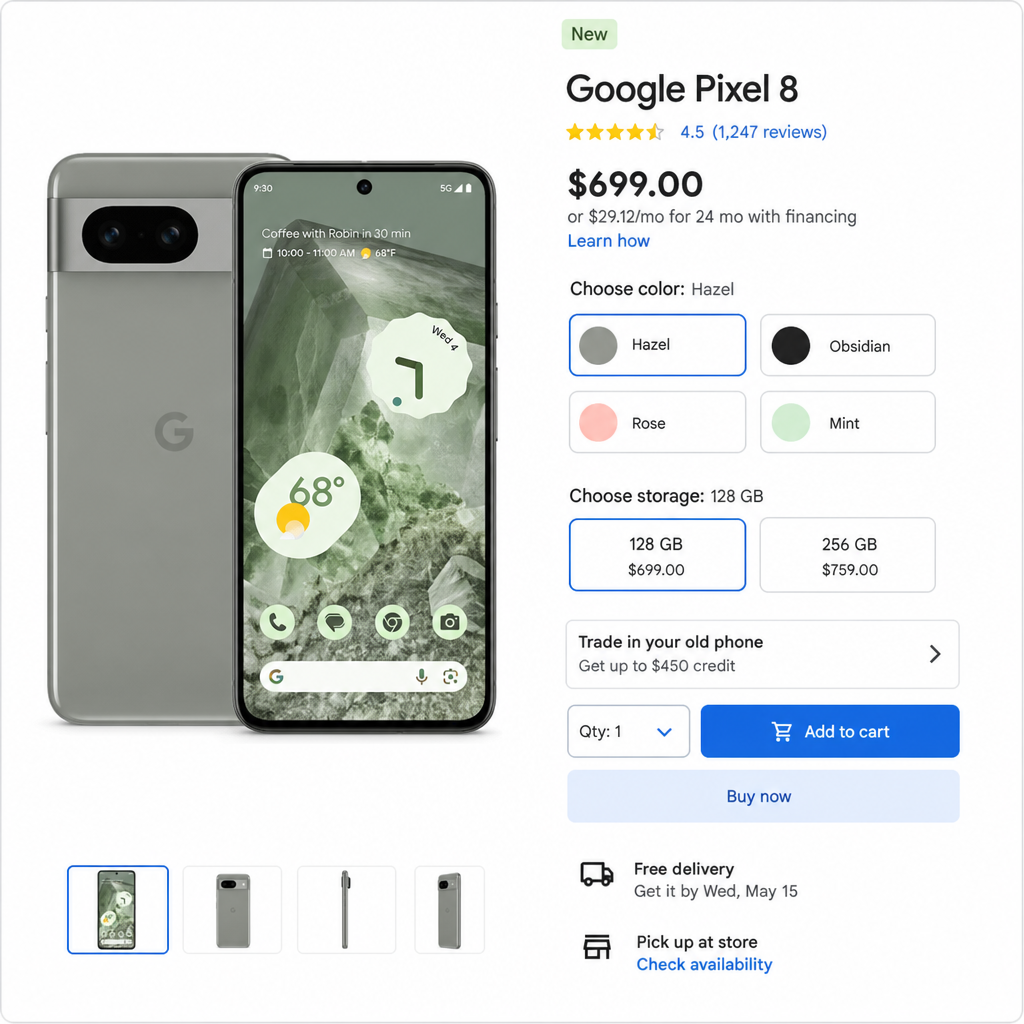
The latest Google Pixel experience is built around AI, camera quality, and long software support
The newest Pixel pitch is not just faster hardware. It is the combination of Google Tensor performance, AI-assisted photo and productivity tools, bright displays, and a software update policy designed to keep supported phones useful for years. Google lists Pixel 8 and later phones as receiving 7 years of OS, security, and Pixel Drop updates from first availability on the US Google Store, while Pixel 6, Pixel 6 Pro, Pixel 7, and Pixel 7 Pro are listed for 5 years of updates from first availability. (support.google.com)
That matters because Pixel features do not arrive only on launch day. Pixel Drops can add or upgrade features over time, although availability depends on device, region, carrier, and rollout timing. If you want the longest runway, choose Pixel 8 or later. If you are considering a used Google Pixel 6 or Google Pixel 6 Pro, factor remaining update support and battery health into the total value.
The latest Pro models also push the Pixel camera system further. Google’s Pixel 10 Pro and Pixel 10 Pro XL specs list a Pro triple rear camera system with a 50 MP wide camera, 48 MP ultrawide camera with Macro Focus, 48 MP 5x telephoto camera, Pro Zoom up to 100x, and a 42 MP front camera with autofocus. (store.google.com) For a buyer, that translates into better flexibility: wide shots for daily scenes, ultrawide for architecture and groups, telephoto for faraway subjects, and software-supported editing when the image needs cleanup.
Core features that make Pixel easier to live with
Google Pixel is at its best when the phone reduces small daily friction. The camera handles difficult scenes. The software stays clean. Assistant and Gemini-connected experiences help with writing, searching, organizing, and editing when supported. Security updates arrive directly through the Pixel update process instead of depending entirely on a third-party phone maker.
Feature highlights to consider before buying
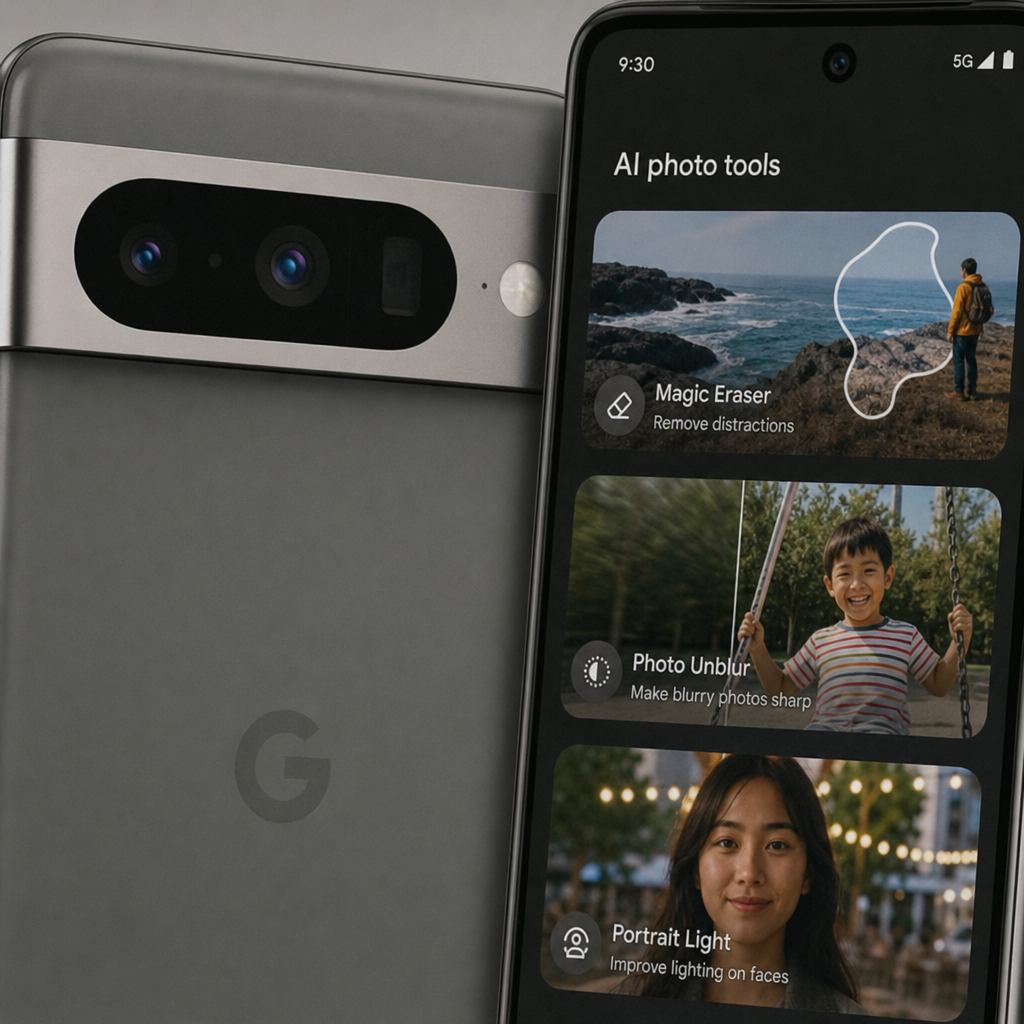
- Pixel camera processing. Pixel phones are known for computational photography, and current Pro models pair high-resolution sensors with tools such as Macro Focus, Night Sight, Astrophotography, Portrait tools, Best Take, Magic Eraser, Photo Unblur, and Zoom Enhance, depending on model support. (store.google.com)
- AI-assisted editing. Newer Pixel phones support editing workflows that can help reframe, remove distractions, improve portraits, and adjust images with less manual work.
- Tensor performance. The latest Pixel Pro models use Google Tensor G5, and Google describes it as a major performance step for AI and overall phone performance compared with prior Tensor generations. (store.google.com)
- Long-term updates. Pixel 8 and later models receive 7 years of OS, security, and Pixel Drop updates from launch availability, making them stronger choices for buyers who keep phones longer. (support.google.com)
- Display improvements. Current Pixel 10 Pro models feature Super Actua displays with up to 3,300 nits peak brightness, making outdoor use easier than on dimmer older displays. (store.google.com)
- Security foundation. Pixel models include Google-designed hardware and software security features, with newer models benefiting from the longest support window.
The practical benefit is simple: Pixel is a strong fit if you want a phone that feels helpful before you install dozens of apps. A parent can capture a fast-moving child, fix a blink with Best Take on supported models, and share a cleaner shot. A traveler can use the camera, navigation, translation, and search features without building a complicated setup. A business user can lean on call, messaging, security, and update features while staying inside the Google ecosystem.
Camera upgrades remain the biggest reason to choose a Pro Pixel
If photos and videos matter, start your buying decision with the camera tier. The latest Pro and Pro XL Pixel phones offer the most complete camera hardware, especially when compared with A-series models or older standard models. The Pixel 10 Pro and Pixel 10 Pro XL include a 50 MP wide camera, 48 MP ultrawide camera with Macro Focus, and 48 MP 5x telephoto lens, while Google’s Pixel 9 Pro and Pixel 9 Pro XL specs list a 50 MP wide camera, 48 MP ultrawide with Macro Focus, 48 MP 5x telephoto, and Super Res Zoom up to 30x. (store.google.com)
For everyday buyers, those numbers matter only when they change what you can capture. A telephoto lens helps at concerts, sports, graduations, wildlife moments, and travel landmarks where you cannot physically move closer. Macro Focus helps with food, flowers, product details, textures, and close-up creative shots. A stronger front camera helps with group selfies, video calls, and creator-style recording.
Choose a Pro camera system if you often shoot:
- Kids, pets, sports, or events where moments happen quickly
- Travel photos with distant buildings, landscapes, or landmarks
- Close-up detail shots for products, food, plants, or hobbies
- Night scenes, city streets, campfires, or low-light interiors
- Social content where quick editing matters more than desktop software
- Portraits you may want to print, crop, or post at higher quality
Google Pixel 8 Pro and Google Pixel 7 Pro still make sense for many shoppers, especially refurbished or discounted, because they preserve the Pro-style appeal: better cameras, bigger displays, and more advanced imaging than entry-level models from the same era. But if the newest camera tools and longest update life are priorities, newer models are easier to justify. Buyers comparing Google Pixel 6 Pro with newer Pro models should pay close attention to battery wear, update runway, and camera feature availability rather than judging only by launch-era flagship status.
Performance, battery, and charging fit different kinds of users
Performance is no longer just about opening apps quickly. On Pixel, performance affects on-device AI, image processing, video features, voice tools, background security, and the smoothness of daily multitasking. Google’s Pixel comparison materials list current Pixel 10 Pro and Pixel 10 Pro XL models with Tensor G5 and 16 GB of RAM, while the standard Pixel 10 is listed with Tensor G5 and 12 GB of RAM. (store.google.com)
Battery expectations should be matched to your routine. Current Pixel 10 Pro models are described as offering more than 24 hours of battery life, with Extreme Battery Saver extending much longer under limited-use conditions. Google also states that Pixel 10 Pro XL can charge to 70 percent in about 30 minutes with a compatible 45W USB-C PPS charger or higher. (store.google.com)
Match the model to your day
- Heavy creator or traveler: choose a Pro XL-style model for the larger display, stronger camera flexibility, and high storage ceiling.
- Work-focused multitasker: choose a newer Pro model for RAM, update longevity, security, and a bright display for outdoor use.
- Everyday user: choose a standard Pixel or A-series Pixel if you mainly browse, message, stream, take casual photos, and use Google apps.
- Budget upgrader: compare Google Pixel 8a with refurbished older Pro models, then decide whether you prefer newer update support or older flagship hardware.
- Used-phone buyer: check battery health, storage size, update status, warranty coverage, and whether the device is carrier unlocked.
This is where many buyers overbuy or underbuy. A large Pro XL phone is excellent if you watch video, edit photos, read documents, or want a bigger keyboard. A smaller model is better if you value one-handed use and pocket comfort. An older flagship can feel premium, but a newer midrange Pixel can be the smarter long-term purchase when update years matter.
Pixel model guidance for popular choices
The best Google Pixel is the one that fits your budget, update expectations, and daily habits. Do not choose only by release date or camera megapixels. Think about how long you plan to keep the phone, whether you buy new or refurbished, and how often you use camera zoom, video, gaming, or AI features.
Latest Pro and Pro XL models
Choose the newest Pro or Pro XL if you want the strongest Pixel camera package, the most current Tensor chip, the brightest current display experience, and the longest support window. Pixel 10 Pro XL is especially compelling for buyers who want a large screen, top-tier camera range, and storage options up to 1 TB. (store.google.com)
Google Pixel 9 Pro XL
Google Pixel 9 Pro XL remains a strong search and shopping choice for people who want a premium Pixel without necessarily buying the newest model. It offers a Pro triple rear camera system, a large-display flagship format, and 7-year update eligibility because Pixel 8 and later models fall under Google’s longer update policy. (support.google.com) If you find it new, refurbished, or discounted, compare the final price against the latest Pro XL before deciding.
Google Pixel 8 Pro
Google Pixel 8 Pro is still important because it helped establish Google’s longer 7-year update promise for Pixel 8 and later devices. (support.google.com) It is a smart comparison point for shoppers who want Pro camera features, a premium screen, and a long remaining support period at a reduced price. If the price gap to newer Pro models is small, choose newer; if the discount is meaningful, Pixel 8 Pro can be a practical flagship buy.
Google Pixel 8a
Google Pixel 8a is a value-focused route into the Pixel experience. It is best for users who want clean Android, Pixel camera processing, Google apps, security updates, and a manageable price. Because Pixel 8a is included among Pixel 8 and later models in Google’s 7-year update policy list, it can be attractive for buyers who care more about software lifespan than having the highest-end camera hardware. (support.google.com)
Google Pixel 7 Pro
Google Pixel 7 Pro is most appealing as a used or refurbished phone when the price is clearly lower than newer options. It can still suit buyers who want a premium-feeling Pixel with a Pro-style camera setup, but it does not receive the same 7-year update window as Pixel 8 and later phones. Google lists Pixel 7 Pro under the 5-year update group, so the purchase should be judged by remaining support, battery condition, and warranty coverage. (support.google.com)
Google Pixel 6 and Google Pixel 6 Pro
Google Pixel 6 and Google Pixel 6 Pro can be tempting if the price is low, but they require the most careful review. Google lists Pixel 6 and Pixel 6 Pro in the 5-year update group, and older batteries may not perform like they did when new. (support.google.com) Buy them only when the condition, return policy, storage, carrier unlock status, and price make sense compared with a newer Pixel 8a or discounted Pixel 8-series device.
The software experience is the hidden value
Pixel software is designed around direct access to Google’s Android features, regular updates, and device-specific improvements. Users can check updates in Settings, and Google notes that updates roll out in phases, so a feature may take time to reach every region, carrier, or device. (support.google.com) That makes Pixel ownership feel different from phones where software updates may be slower, less predictable, or heavily customized.
Pixel Drops are a key part of that value. They can bring new and upgraded features after purchase, although the exact feature set depends on hardware support and rollout eligibility. This is one reason a newer Google Pixel can be worth more than an older flagship with impressive launch specs: the newer phone may keep receiving more improvements for longer.
The clean software approach also helps buyers who do not want to spend time removing unnecessary apps or learning a heavily modified interface. Pixel works well for Gmail, Google Photos, Google Maps, Chrome, YouTube, Drive, Meet, Calendar, and other Google services. If your life already runs through a Google account, Pixel is built to feel familiar on day one.
Specifications that matter before checkout
Specs are useful when they connect to real behavior. A bigger battery helps if you travel or work long days. More RAM helps with demanding multitasking and newer AI features. More storage matters if you shoot lots of video, keep offline playlists, or download games. A brighter display matters if you use your phone outdoors.
Pre-purchase specification checklist
- Display size: choose larger for media, editing, reading, and typing; choose smaller for one-handed comfort.
- Camera tier: choose Pro for telephoto zoom, advanced imaging, and more creative flexibility.
- Storage: choose more if you shoot video, keep years of photos, or plan to own the phone for a long time.
- Battery and charging: compare stated battery life, charging speed, and charger requirements before buying.
- Update policy: choose Pixel 8 or later for Google’s 7-year OS, security, and Pixel Drop update window. (support.google.com)
- Carrier compatibility: confirm unlocked status, network support, eSIM or SIM needs, and carrier promotions.
- Condition: for used phones, inspect battery, screen, camera glass, charging port, warranty, and return policy.
This checklist is especially important when comparing models across generations. A Google Pixel 9 Pro XL may beat an older phone in support life and AI features. A Google Pixel 8 Pro may offer a better value than the newest Pro if discounted enough. A Google Pixel 8a may be the most sensible choice if you want a new phone, long updates, and a lower price.
The best Pixel choice by buyer type
For the best all-around premium purchase, choose the newest Pixel Pro or Pro XL you can comfortably afford. You get the most current camera system, display improvements, Tensor performance, and update runway. The Pixel 10 Pro XL is the standout for shoppers who want the biggest current Pro format and top storage flexibility. (store.google.com)
For value-focused flagship shopping, compare Google Pixel 9 Pro XL and Google Pixel 8 Pro. Both sit in the modern long-support era, and both can make sense if priced well against the latest models. The decision should come down to final checkout price, storage, condition, camera needs, and how long you plan to keep the phone.
For a lower-cost new Pixel, Google Pixel 8a is the model to evaluate first. It gives everyday users the Pixel identity: clean Android, Google software, useful camera processing, and long support. It is not the right choice for buyers who need the most advanced zoom or the largest display, but it is easy to recommend for practical daily use.
For older used phones, Google Pixel 7 Pro, Google Pixel 6 Pro, and Google Pixel 6 should be bought only when the discount is significant. They can still serve basic users well, but update runway and battery wear are real purchase factors. If the used price is close to a newer Pixel, choose the newer Pixel.
Complete your Pixel purchase with confidence
A strong Google Pixel purchase starts with a clear priority: latest features, best camera, lowest price, biggest screen, longest updates, or safest used-phone value. Once you know that priority, the choice becomes simpler. Pick the latest Pro XL for the most advanced experience, Google Pixel 9 Pro XL or Google Pixel 8 Pro for premium value, Google Pixel 8a for affordable longevity, or an older Google Pixel 7 Pro, Google Pixel 6 Pro, or Google Pixel 6 only when the condition and price are compelling.
Before you complete checkout, review storage, color, carrier status, trade-in value, protection plan, delivery date, return policy, and total cost. Then choose the purchase action that fits your situation.
Button: Buy your Google Pixel today
Button: Compare Pixel models before checkout
Button: Start with trade-in and unlocked options
Get a Pre-Configured GrapheneOS Phone
Skip the technical setup. Every device from EncPix comes with GrapheneOS installed, bootloader re-locked, and ready to use. Brand new, UK shipped.
Shop Devices →